Trades
HVAC inspection app: the checklist, the photos, and the report link
12 min read
An HVAC inspection app has one job that matters more than the rest: when the visit is over, the homeowner (or the property manager, or the buyer’s agent) can see what you looked at, what you found, and what you recommend—without calling you to explain it again. Everything else is plumbing. A checklist keeps the tech from skipping the condensate line. Photos prove the coil was dirty before you quoted a cleaning. Readings back up the “your system is low on charge” conversation. The report is where all of it lands.
This page is for owners and lead techs at small HVAC shops who run maintenance agreements, pre-season tune-ups, home-sale inspections, or new-install commissioning and are tired of paper forms, camera rolls, and PDFs nobody opens. If you want the broader picture of HVAC software—design tools versus dispatch suites versus job links—start with HVAC software for service calls. This article zooms in on the inspection itself.
What an HVAC inspection app has to do on site
Most “HVAC inspection software” lists rank apps by how many form fields they support. That is the wrong test. Inspections fail in the field for three boring reasons: the tech is on a ladder with one free hand, the attic has no signal, and the photo that proves the finding is taken after the panel is back on (or never). Score an app on those three, not on the form builder.
- Order: the checklist follows the walk—thermostat, indoor unit, ductwork, outdoor unit, safety—so nobody scrolls back and forth.
- One-hand capture: tapping a step, taking a photo, and adding one line of text should take under a minute.
- Photo-to-item link: each photo sits under the item it proves, not in a gallery of forty unlabeled shots.
- Readings next to evidence: static pressure, temperature split, and amp draw belong beside the photo of the gauge or meter.
- Customer-ready output: a link the homeowner opens in a browser, with no app download and no portal password.
- Re-open later: the same link still works next season, when the recommendation turns into a sale or a warranty question.
An HVAC inspection checklist you can copy
Below is a residential split-system checklist in walking order. It is deliberately short. Long checklists get pencil-whipped; short ones get done. Add or remove lines to fit your maintenance agreement, then save it as a template so every tech walks the same route.
1. Thermostat and complaint
- Photo of the thermostat display: set point, actual temperature, mode.
- One line: what the customer reported, in their words (“upstairs never cools”).
- Batteries / wiring condition if the cover comes off.
2. Indoor unit (furnace or air handler)
- Nameplate photo: model, serial, age. This saves a trip when a part or warranty question comes up.
- Filter as found—size and condition. The before photo sells the next filter change.
- Blower wheel and motor, capacitor if accessible.
- Evaporator coil (where accessible) and the drain pan.
- Burner, flame sensor, heat exchanger visual on gas furnaces; flue connection.
3. Condensate and drainage
- Condensate line and trap; float switch present and working.
- Secondary pan in attic installs—photo of what is sitting in it.
4. Ductwork and airflow
- Visible duct connections, disconnected runs, crushed flex.
- Static pressure reading (photo of the manometer) if you take one.
- Supply/return temperature split, written next to the thermometer photo.
5. Outdoor unit (condenser or heat pump)
- Nameplate photo.
- Coil condition and clearance—vegetation, debris, fence too close.
- Contactor, capacitor, fan motor; amp draw if measured.
- Line set insulation and the service valves.
- Refrigerant pressures / superheat / subcool if checked, written beside the gauge photo.
6. Safety and wrap-up
- CO reading near the appliance on fuel-burning equipment.
- Disconnect, breaker size, and visible electrical hazards.
- Findings ranked: OK / monitor / recommend repair / safety issue.
Which photos actually prove an HVAC finding
A finding without a photo turns into a debate. “Your coil is dirty” is an opinion; a close-up of the coil with your flashlight on it is a fact. The trick is taking the photo at the moment the evidence is visible—when the access panel is off, before you clean, before you close up.
| Finding | Photo that proves it | When to take it |
|---|---|---|
| Dirty filter | Filter held up to light, size label visible | Before you swap it |
| Dirty evaporator coil | Coil face with flashlight | Panel off, before cleaning |
| Weak capacitor | Meter reading next to the capacitor rating label | During test |
| Clogged drain | Standing water in pan or trap | Before clearing |
| Crushed or disconnected duct | Wide shot plus close-up of the gap | Before repair |
| Low charge (suspected) | Gauge set with readings visible | During check |
| Heat exchanger concern | Camera or mirror shot of the area | Before you shut it down |
Inspection findings and the photo that backs each one
Two photos per finding is usually enough: one wide so the customer understands where it is, one close so they see the problem. More than that turns the report into a scroll test.
From inspection to report: why a link beats a PDF
The classic HVAC inspection report is a PDF generated from a form and emailed to the homeowner. It looks official and almost nobody reads it. Photos are shrunk to thumbnails, the email lands in Promotions, and three weeks later the customer calls asking what “recommend coil cleaning” meant.
A report link solves the boring problems. The homeowner taps it from your text message. Photos are full size on their phone. Each finding sits under its step. When you call back with a quote, you both look at the same page. When a buyer’s agent or landlord needs it, the homeowner forwards one URL instead of digging through email.
- No attachment: the link opens in the browser, so file size and spam filters stop being your problem.
- Photos stay sharp: no compression into a four-photo PDF grid.
- Same link next season: last year’s inspection is one tap away when the tech returns.
- Status, not just snapshot: if the inspection turns into a repair, the same page can show the part on order and the finished fix.
How to share that link without becoming tech support is covered in share job photos with customers. Short version: send it once from your phone, then keep pointing people back to the same URL.
Maintenance, home-sale, and commissioning inspections
Maintenance agreement visits
Tune-ups are where most HVAC inspection apps earn their keep. The customer pays every year and wants proof something happened. A link with the filter before/after, the coil photo, and three readings does more for renewal rates than a “Service Complete” sticker on the furnace.
Home-sale and pre-purchase HVAC inspections
Buyers, sellers, and agents all ask the same questions: how old is it, does it work, what will it cost soon. Nameplate photos answer age. Readings answer “does it work.” The ranked findings answer cost. A shareable link means the agent can forward it without you emailing three parties.
New-install commissioning
HVAC commissioning software, for a residential shop, is mostly a startup checklist with numbers: static pressure, temperature split, refrigerant readings, line set before it gets covered. The same template approach works. The photo of the line set before insulation and the startup readings are exactly what a warranty claim or a callback argument needs.
Where Opeo fits in an HVAC inspection workflow
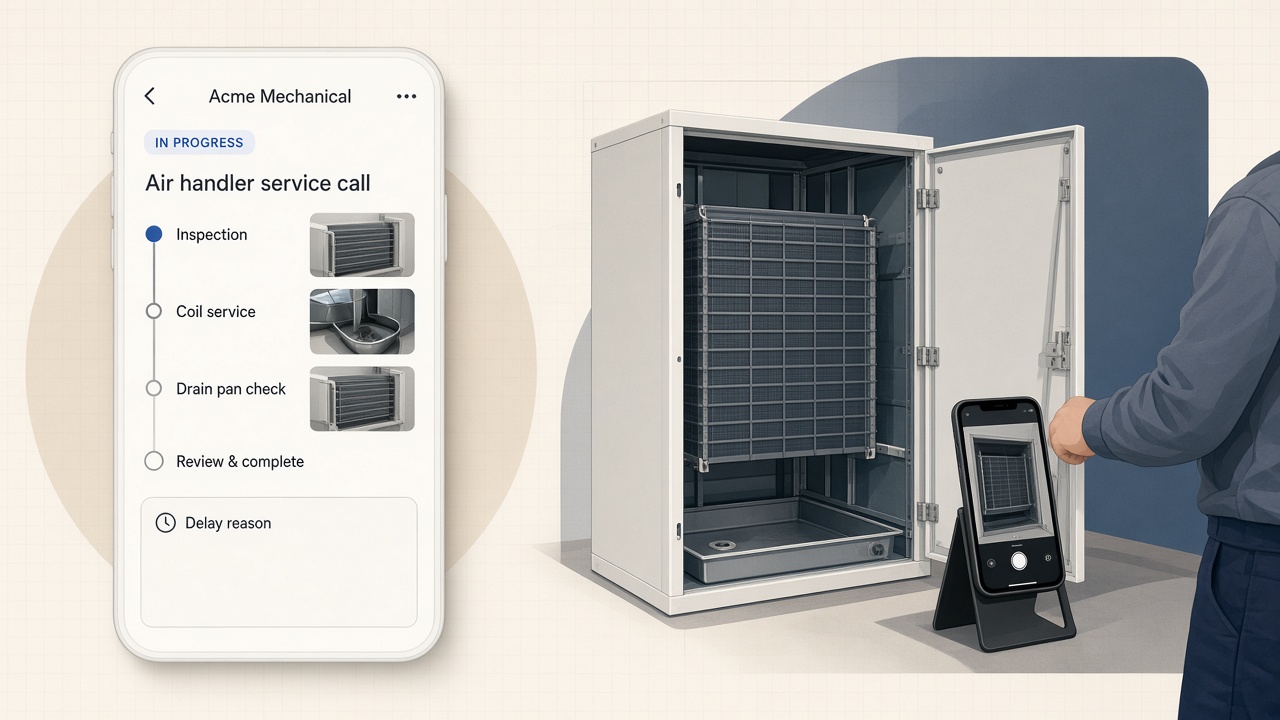
Opeo is the job page: steps, photos, short notes, status, and a link the customer opens without an account. Build an inspection template once—the six sections above work as steps—and every tech starts from the same checklist. Photos go under the step they prove. When the visit ends, you copy the link, show the QR code, or open a text draft from your phone with the link filled in.
| Part of the job | Opeo | Where it belongs instead |
|---|---|---|
| Checklist template per inspection type | Yes | — |
| Photos under each checklist step | Yes | — |
| Notes and readings typed beside photos | Yes | — |
| Customer report link, no login | Yes | — |
| Delayed status with a reason (part on order) | Yes | — |
| Who on the crew changed the job | Work log on Pro and Scale | — |
| Refrigerant / superheat calculators | No | Your gauge app or manifold software |
| Quotes, invoices, maintenance contracts | No | Your field service suite |
| Dispatch, routing, scheduling | No | Your field service suite |
What Opeo does and does not do for HVAC inspections
If you already run Jobber, Housecall Pro, ServiceTitan, or Tradify, keep it for the calendar and the invoice. The inspection link sits beside it. The comparison pages for Jobber and Housecall Pro show that split.
Run your next five inspections on a link
- Create a template called “Maintenance inspection” with the six sections above as steps.
- On the next tune-up, take the nameplate and filter photos first—before you touch anything.
- Add readings as one-line notes under the photo of the gauge or meter.
- Mark findings in the last step: OK, monitor, recommend, safety.
- Send the link from your phone before you leave the driveway.
The Free plan covers five jobs a month and fifteen photos per job, with templates and no card—enough to test a week of tune-ups. Limits and paid tiers are on pricing. The HVAC page shows what the customer sees, and the sample job page opens without signing up.
Common questions
What is the best HVAC inspection app for a small shop?
The one your techs will actually use on a ladder: a checklist in walking order, one-tap photos tied to each item, and a report the customer opens without a login. Big suites have inspection forms too; if you already pay for one, test its form on a real visit before adding another tool.
What should an HVAC inspection checklist include?
Thermostat and complaint, indoor unit (nameplate, filter, blower, coil, drain pan, burners on gas units), condensate and drainage, ductwork and airflow readings, outdoor unit (nameplate, coil, electrical, refrigerant readings), and safety checks like CO and disconnects. Finish with ranked findings.
Is a PDF inspection report better than a link?
A PDF is fine for a permit file. For the homeowner, a link is easier: it opens from a text, shows full-size photos, and stays the same URL when the inspection turns into a repair or the next season’s visit.
Can Opeo calculate superheat or subcooling?
No. Opeo stores the photo of your gauges and the readings you type. Calculations stay in your gauge app or manifold software.
Can I use the same app for HVAC commissioning?
Yes, if commissioning for you means a startup checklist with photos and readings. Make a separate template with line set, startup readings, and static pressure steps. Engineering-grade commissioning documentation for commercial projects is a different product.
Keep reading
Create the job link free
Free is 5 jobs a month and 15 photos on each job. The customer opens one page. No card.