Pillar
Field service management software for crews that work on site
12 min read
Field service management software is the label vendors put on the stack that runs work away from a desk: a schedule, a way to assign the visit, a quote, an invoice, and a record of what happened at the address. A small crew rarely needs every piece on the first Tuesday. The piece that fails in a driveway, on a roof, and in a kitchen is the same one. The customer cannot see what you found, what you did, or why the job stopped.
Opeo is the job link for that record. Photos, steps, a delay with a written reason, and comments sit on one page. The customer opens it in the browser. They do not install an app and they do not create an account. The page is the same for a roof, a remodel, a service call, and a car in a bay. Detailing and paint protection film are two trades that already use it. They are not the limit of it.
This is the map of the category. Three narrower articles sit next to it: jobsite photo documentation, field service management software free plans, and apps for contractors.
What field service software usually includes
Search “service management software” or “field service software” and the results are suites. They sell a calendar, dispatch, quotes, invoices, and a customer database. For small trades, the names that keep coming up are Jobber, Housecall Pro, and Tradify. When we checked public starting prices in June 2026, Jobber listed $39 a month for one user, Housecall Pro listed $49 a month, and Tradify listed $39 per user per month. Those numbers move. The Jobber, Housecall Pro, and Tradify pages say when to keep the suite.
A suite earns its fee when the office lives in it. The person on the ladder still has a separate problem: the photo of the soft deck, the panel, or the scratched island has to be somewhere the customer can reopen next week. That is a field service app in the narrow sense. It is a page, not a second company to run.
| The job | Where it belongs |
|---|---|
| Crew calendar, routes, recurring visits | A scheduling suite |
| Quotes and invoices | The tool that already sends them |
| Photos the customer can reopen without an account | A job link |
| A delay with a written reason | A job link |
| Your logo on the customer page | Opeo Pro |
| Who changed the job | Work log on Pro and Scale |
Where each job belongs
Mobile field service is the phone in your hand
Mobile field service management software, in a brochure, means a technician app with a route and a form. On a Tuesday it means a phone in a glove, on a ladder, or in a kitchen with no countertop. The person on site has about a minute. They mark the step, add the photo, and write a reason if the job is delayed. You copy the link, show the QR code on the page, or open a text draft on your own phone. The message goes out from you. Opeo does not text the customer and does not email them.
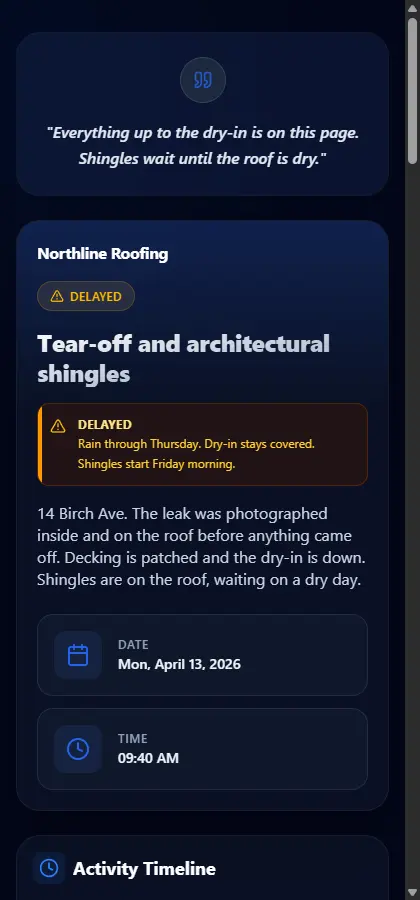
A field service mobile app that asks the homeowner to download something will sit unopened in the driveway. The link is the field service management app they actually use. Your side is the browser on your phone as well. There is no separate install to require of the customer, and the product does not work offline. Add the photo when the phone has a signal.
The same job link past detailing and PPF
Shops that tint, wrap, detail, and install paint protection film use the page for a panel, a meter reading, or a film edge. A construction crew uses it for a ceiling stain, a soft deck, a scratch that was already on the island, or a chip in the baseboard. The software does not ask which trade took the photo. The argument, later, is identical: open the frame from that morning.
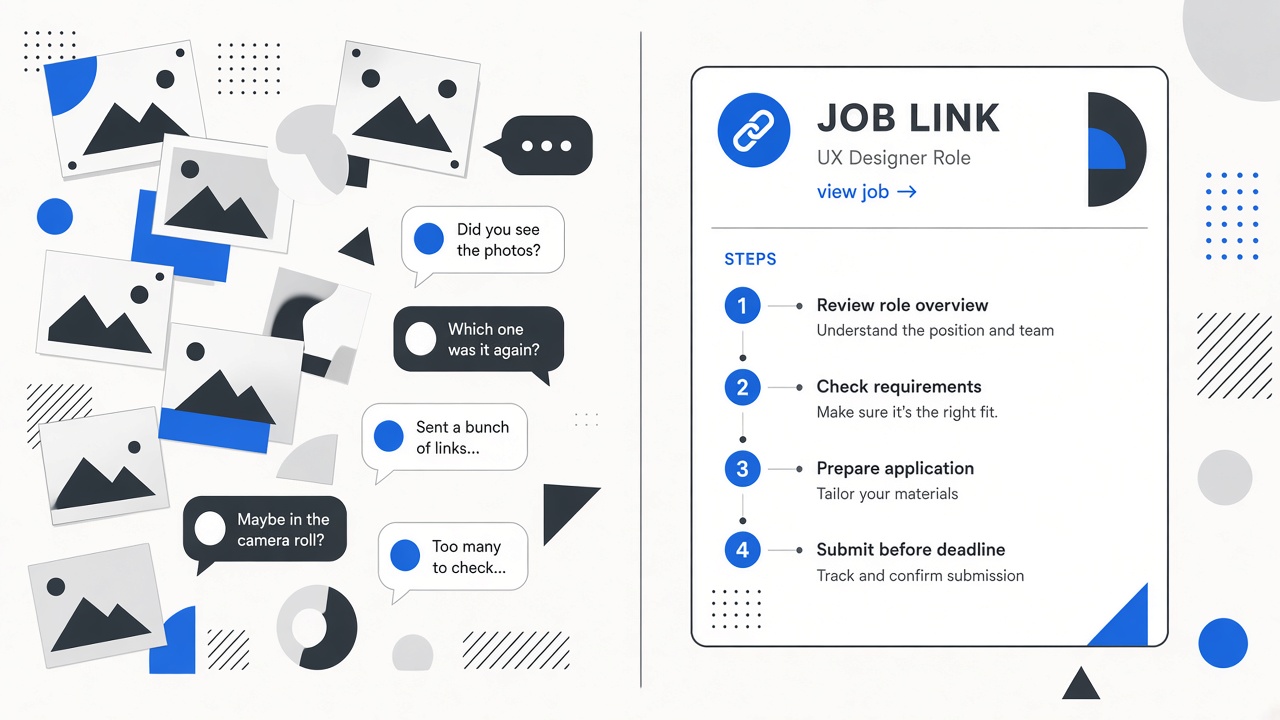
The trade pages are the short version of that habit: roofing, flooring, kitchens, plumbers, electricians, HVAC, and landscaping. Car shops stay on their own pages for detailing, PPF, window tint, and wraps, with shop guides for the shots those bays already argue about. A company that does both a service call and a car can keep one habit.
One Tuesday, three addresses
A roof, stopped for rain
The homeowner calls because the crew left. On the job you already photographed the ceiling stain and the attic on Monday, before a shingle came off. Tear-off, the soft plywood, and the dry-in are later steps. You set the status to Delayed and write the reason: rain through Thursday, dry-in is covered, shingles Friday if it stays dry. The next time they open the link, that sentence is on the page. You do not need a second text thread to reconstruct the week.
A panel in a hallway
The electrician photographs the open panel and the device that is coming out. The customer is standing there, which is the easy moment. The hard moment is Thursday, when someone asks whether that scorch was already on the breaker. The frame is on the job, above today’s step. HVAC and plumbing calls work the same way: the leak, the shutoff, or the coil, before the cabinet or the closet is closed.
A car, same page
A detailing or PPF shop runs the identical page. Intake photos, the work, the handoff. The customer reopens one link when they ask about an edge or a scratch. If your week mixes a roof and a car, you do not learn a second product. You learn the steps of the job you are on.
Scheduling software for field technicians is a different purchase
Field service scheduling software, a field service scheduling app, and scheduling software for field technicians answer a different question: who is going where, and when. Field engineer scheduling software is that same question with a different job title. Opeo does not build the week’s board, the routes, or the recurring visits. If the board is the hole in the day, keep the suite the office already trusts and put the job link beside it.
Technician tracking software, in this search, usually means a dot on a map. Opeo does not track where a technician is standing. The customer sees the status you set, the photos you add, and the delay reason you write. Field service workforce management, in the large products, means shifts, skills, and time clocks. The work log on Pro and Scale is an audit trail of who changed a job, a customer, or a template. It is there when more than one person touches the job. It is not payroll.
Field service software for a small business
“Field service software for small business” and “small business field service management software” are the same search from a three-person company. “Best field service management software for small business” and “top field service management software” are the same search again, with a ranking attached. The lists are almost always the suites. Read them for the calendar and the invoice. Score the job link separately, or you will buy a dispatch board nobody opens from the driveway.
Volume is the practical test. The Free plan is 5 jobs a month and 15 photos on each job, with templates and a customer link, and no card. Starter is $29 a month, or $24 a month if you pay yearly, for 50 jobs and 30 photos. Pro is $89 a month, or $74 yearly, and adds your logo on the link, a work log, and up to 5 seats. Scale is $149 a month, or $124 yearly, for 1,000 jobs, 150 photos each, and unlimited seats. The grid is on pricing. A short video uses one photo slot. The free plan article is the longer version of what stays limited.
Reports, CRM, and invoicing
Field service report software, for a lot of buyers, means a PDF the office emails at the end. The report the customer actually reads is the page: the steps, the photos, the time on the job, and the comment thread under them. If you pair two photos, the page can show them as a before-and-after. The sample kitchen and flooring jobs do that. The timeline still holds every other frame.
Field service CRM software, and a CRM for field service, in a suite means pipelines, campaigns, and quote history. Opeo keeps a customer list and search. It is the list of people you have jobs for. It is not a sales CRM, and it is not a Salesforce field service app. A company that already runs Salesforce Field Service should leave that dispatch system where it is. The link is what you send when the visit needs photos.
Field service invoicing software belongs with the books. Opeo does not send invoices and does not take payment. Field service tools, as a search, is a junk drawer: laser measures, route planners, invoice apps, and CRMs. The tool that has to be on the phone during the job is the one that holds the photo you cannot retake. Everything else can wait until the truck is parked.
Open source field service software
Open source field service management, and field service software open source, is a third path: a suite you host yourself. That fits a team with someone to run the server and the backups. Opeo is hosted. The free plan is a hosted plan with a monthly job cap. There is no source code to install, and there is no freeware file to download. If self-hosting is the requirement, this is the wrong product, and the free-plan article says that in one place so the pricing page does not have to.
Field service management software in Australia and elsewhere
“Field service management software Australia” shows up because several suites market hard there. Opeo is a browser page. Prices on the pricing page are in US dollars. A crew in Australia, or anywhere else with a signal, opens the same job link the customer opens. We do not have an Australian office. The company is remote-first, in Delaware and Poland. The page does not change because the address on the job is outside the United States.
What to put on the first job
- Name the job the way the customer would search their texts. The address and the trade, not an internal code.
- Use a template with the steps you already say out loud. Before, during, after, and a delay when weather or parts can stop the work.
- Add the photos you would want open during a callback. The shot list is in jobsite photo documentation.
- When the job stops, set Delayed and write the reason in a sentence. They read it the next time they open the link.
- Copy the link or show the QR code. Send it from your phone.
Five jobs on the free plan is enough to learn whether the callbacks get shorter. Contractors who are choosing among drawing apps, lead apps, and a job page should read apps for contractors before they buy a tool built for a different job.
Common questions
Is Opeo field service management software?
Opeo is the customer job link: photos, steps, a delay reason, and comments. Scheduling, dispatch, quotes, and invoices stay in a field service suite when you need them.
Do customers need an app?
No. They open the link in the browser and do not create an account. Opeo does not text or email them. You share the link from your phone, or show the QR code on the page.
Does this work for construction, or only for detailing and PPF?
The page is the same. Roofing, flooring, kitchen remodels, plumbing, electrical, HVAC, and landscaping use it the way a detailing shop does: one job, photos in order, and a status the customer can reopen.
Can I run this next to Jobber or Housecall Pro?
Yes. Keep the suite for the calendar and the invoice. Use the job link when the customer needs to see the work. The vs pages spell out that split.
Is there a free plan?
Yes. Five jobs a month, 15 photos on each job, templates, and no card. Your logo and team seats are on Pro. Starter raises the job and photo caps for a single seat.
Keep reading
Create the job link free
Free is 5 jobs a month and 15 photos on each job. The customer opens one page. No card.