What's new in Opeo
We built Opeo for our own shops first. Here is what shipped — from field fixes to bigger workflow changes.
v2.17.0Latest Release
October 2026Customer job page
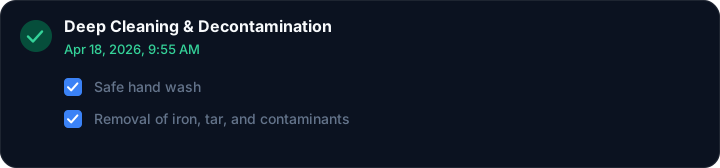
The link you send now answers “where are we?” without a phone call. Customers see which step is open, and when a finished step was closed.
- Step progress: The job page shows “Step 6 of 7” with a bar and the name of the open step. Skipped steps stay out of the count. The same line sits in the sticky header once they scroll.

- Finished-step time: When you complete a step, the customer link stamps the date and time under that step, above its checklist. The clock is the moment the step was marked done.
Sharing
Show QR & Link on a job now puts a real link under the code. Open it, or copy it, without selecting the text.
- Open the job link: The address under the QR code opens the customer page in a new tab.
- Copy icon: The icon beside the address copies the full link. You get the same “Link copied” confirmation as the copy button in the job header.
Bug Fixes
- Progress after a skip: Skipping a step no longer inflates the total, so a 7-step template still reads “of 7.”
- “Created” vs Step 1 of 3: The timeline used to show a Created card that looked like an extra step above Intake. Progress only counts template steps, so a 3-step job could read “1 of 3” while four cards sat on the list. Created is now a short “Job opened” line with the date, not a step card.
- Sticky step name: Scrolling the customer page kept an old step title in the header until a refresh. It now follows the open step.
- One-step jobs: A template with a single step no longer drew the progress bar past the end of the track.
- Completion time on phones: The finished-step timestamp no longer collides with the first checklist row when the step name wraps.
- Reopened steps: Marking a completed step back to in progress clears the old timestamp instead of leaving yesterday’s time on the link.
v2.16.0
September 2026Sharing
Send a job link the way most shops already talk to customers—WhatsApp—without giving Opeo a seat in the conversation.
- WhatsApp share: Next to SMS on every job, tap WhatsApp to open a pre-filled draft with your public link. One tap, then send from the WhatsApp app on your phone or computer.
- Your chat, not ours: Opeo does not send, store, or read WhatsApp messages. We never sit in the middle of your client conversations—the draft opens on your device and stays there.
- Same privacy as SMS: Like the SMS button, this only opens your messaging app with text you can edit before sending. No carrier hookups, no message relay, no inbox on our servers.

Bug Fixes
- Share bar on narrow phones: Preview, QR, SMS, and WhatsApp wrap cleanly in a 2×2 grid instead of crowding the sticky header.
- Timeline note flicker: Saving an internal note no longer briefly clears the text field on slow connections.
- Customer picker scroll: Long customer lists keep keyboard focus when you open the dropdown mid-scroll on the new-job form.
- Media library empty state: After deleting the last photo in a filter, the empty message appears immediately instead of a blank strip.
- Public link dark mode: Status badges on the customer share page keep readable contrast under the shop brand color.
v2.15.3Patch
August 2026August at a glance
A quiet maintenance release for shops already running jobs day to day. Nothing new to learn—just smoother phones, clearer feedback, and fewer papercuts on the floor.
Improvements
- Checklist on phones: Larger tap targets on timeline sub-tasks so you can mark work done without missing the box mid-bay.
- Jobs list memory: Status and customer filters stay put when you open a job and return—less re-filtering every time you bounce back.
- Settings confirmation: Saving workspace name or hours now shows a short success message, so flaky Wi‑Fi does not leave you guessing.
- Contact form: After a failed send, focus moves to the first problem field so you can fix it without hunting.
Bug Fixes
- Public photo view: Closing a zoomed timeline photo no longer leaves a dim overlay on the customer share page.
- Copy job link: The “Copied” confirmation stays visible above sticky actions on short laptop screens.
- Step reorder: Dragging custom steps no longer shows a faint duplicate label until you drop.
- Customer phone paste: Numbers pasted with spaces or dashes save cleanly instead of failing validation.
- Before/After slider: On landscape tablets, the handle follows your finger so wrap comparisons do not jump.
v2.15.2Patch
July 2026Patch notes
Mid-summer maintenance—small fixes from the field and a bit of polish on public pages. No workflow changes.
- Customer search: Special characters in the jobs customer picker no longer blank the dropdown mid-type.
- Public thumbnails: Timeline images after a re-upload resolve on first refresh instead of occasionally showing the previous file.
- Expired job links: 404 pages on old public URLs suggest contacting the shop—not a generic “page not found.”
- Dark table headers: Jobs list and sidebar labels read more clearly on bright outdoor screens.
- Landing preview flash: Dashboard mock on the homepage picks light or dark assets on first paint—no wrong screenshot for a frame.
- ROI image deferral: Below-the-fold screenshots load after hero content so cellular first paint stays snappy.
- Error page retry: Global error screen keeps the digest ID visible after a failed retry so support can match logs.
v2.15.1Patch
June 2026Public Links & Sharing
- Share URL cleanup: Job and share links open the same page whether or not a trailing slash is included—fewer broken previews when you copy a link.
- Login return path: After signing in from a marketing page, you land back where you intended more reliably.
Jobs & Timeline
- Long step names: Custom step labels on the job timeline truncate cleanly on narrow screens, with a tooltip on hover.
- Checklist Sync: Tapping sub-tasks quickly on slower connections no longer leaves checkboxes out of sync with the job.
Media & Mobile
- Upload Retry Indicator: Background photo uploads that stall now show a subtle retry state instead of silently hanging—so you know when to wait vs. re-shoot.
- Preview Button Overlap: Fixed the floating job preview button overlapping timeline actions on very small phones.
UI & Polish
- Landing video: No brief empty flash before the intro video poster loads on slow connections.
- Customer Search Clear: Clearing the customer search field no longer leaves a stale filtered list until you navigate away.
v2.15.0
May 2026Product Story & Landing
- See it in action: A short product video on the homepage walks new shops through job tracking and customer share links.
- Richer phone demo: The landing scroll demo now shows a full wrap workflow with realistic steps and photos.
Reliability & Access
- Public pages stay public: Marketing pages and customer share links no longer bounce visitors into login by mistake.
- Live demo stays current: The try-it demo job on the homepage matches the latest product flow.
Speed & support
- Faster media on the site: Videos, images, and screenshots load sooner on the marketing pages.
- One support inbox: Contact now goes to hi@opeo.io—one place for questions and feedback.
v2.14.0
April 2026User Experience
- Dashboard spacing: Tighter layout on jobs and customer lists so more of the week fits on one screen.
- Navigation feedback: Clearer button and nav transitions when moving between jobs, customers, and settings.
Performance & Stability
- Faster draft loads: Leaner state updates when opening a job so the timeline appears sooner on slower connections.
- Workspace checks: Stricter validation so team members only land in workspaces they belong to.
Quality of Life
- Consistent controls: Jobs, customers, and settings now share the same button and form styles.
- Background fixes: Small stability patches from support reports — nothing that changes how you run a job.
v2.13.0
April 2026Flexibility
- Custom steps & templates: Add custom steps to any job and edit freely — you are not locked to the original template.
- Timeline refresh: Cleaner job timeline styling so progress is easier to scan at a glance.
Onboarding & polish
- Faster onboarding: Shorter path from sign-up to the first tracked job.
- Clearer forms: Customer details and Before/After comparisons feel the same wherever you open them.
- Fewer bad submits: Forms catch incomplete fields earlier, and pages load a bit snappier.
v2.12.3
March 2026Before & After
- Mobile ratio: Before/After slider aspect ratio fixed on phones.
- Timeline taps: More reliable timeline buttons on public links (fewer missed taps).
Fixes
- Checklist sync: Rapid checkbox taps on slow connections no longer leave sub-tasks out of sync.
- Pagination: Cleaner paging on longer job and customer lists.
- Small UI fixes: Assorted cleanup from support reports.
Security
- Upload hardening: Tightened validation in the photo upload path.
v2.12.2
March 2026Before & After
- Full-screen comparisons: Expand before/after into a full-screen slider for client walkthroughs.
- Media pairs: Rebuilt pairing so before/after shots stay matched more reliably, including when the connection drops mid-upload.
Accuracy
- Job-site timezones: Photo timestamps follow the job site local time, not only the admin's clock.
- International phones: Removed hardcoded +1 / US flag from customer forms so non-US numbers validate cleanly.
Polish
- Jobs search in dark mode: Search bar contrast fixed in light and dark themes.
- Public link motion: Calmer animations on public pages (less aggressive pulse).
v2.12.0
March 2026Timeline & mobile
- Leaner timeline: Removed redundant progress bars for a clearer view of where each job stands.
- Toast placement: Notifications no longer cover primary actions on small screens in the field.
Pricing
- Clearer plans: Updated pricing and upgrade paths so limits and tiers are easier to compare.
v2.11.0
February 2026Speed & feedback
- Top progress bar: Subtle blue bar after navigation so you know a click registered.
- Skeleton loaders: Layout appears while data loads instead of a blank white screen.
Mobile
- Template editor on mobile: More screen space, insert variables at the cursor, fixed overlapping buttons.
- Touch-friendly cards: Shared card layout for Jobs, Customers, Templates, Team, and Media.
- Tappable stats: Mobile 2×2 stat grid filters the job list on tap.
Fixes
- No auto-scroll on stats: Tapping a stat card no longer jumps the page.
- Mobile menu: Removed duplicate Team item; Work Log shows correctly.
v2.10.0
February 2026Team & workflows
- Roles & permissions: Control what each teammate can see and edit.
- Templates & checklists: Standardize common jobs so new hires follow the same steps.
- Internal comments: Team notes stay private — clients never see them on the public link.
Client-facing
- Branded job links: Public tracking pages with your logo and brand colors.
- QR codes: Generate a QR for the job site so anyone can open status and instructions.
- Delay reasons: Log weather or supply delays so clients see why a job slipped.
Field speed
- Background uploads: Photos keep uploading after you lock the screen or leave the page.
- Async customer search: Find the right client quickly even with large rosters.
- Site timezones: Jobs respect the job-site timezone for distributed teams.
2019–Jan 2026
Shop-floor tool → SaaS. Full version-by-version detail starts at v2.10 above.
- v2.9Landing metrics, wider template columns, upload fixes, and rate limits on public pages.
- v2.8Darker zinc theme, frosted sidebar, reduced-motion support for background effects.
- v2.7Logo, colors, and welcome message on public job pages; safer job/customer create flow.
- v2.6.xFloating preview, checklist sub-tasks, mobile preview mockup, templates & smart steps, background uploads.
- v2.02025 cloud rewrite — Cloudflare R2 + Workers and a full UI redesign.
- v1.432024 — first external customers; internal tool became a product.
- 2019–23Lived in our own shops across multiple branches, then pivoted to SaaS after partners asked to use it.
Ready to try the latest?
Create a free account and send your first job link — no credit card.
Start free